Sun Tan | The Cut Shoppe

We were recently discussing Print Then Cut in The Cut Shoppe -Scrap Spot- Facebook Group. There were quite a few people who had never tried this feature and were curious how it worked or just wanted more detailed information. My friend & owner of The Cut Shoppe, Ashley Horton, and I are teaming up and creating tutorials showing how easy it is to use this feature. Ashley is a Silhouette Cameo user so her video will focus on how to use this feature using the Cameo. My blog post & video will focus on how to use this feature in Cricut Design Space.

12x12 scrapbook layout for The Cut Shoppe Design Team using the Summer Sizzle Print Then Cut & Bella Blvd Island Escape Collection.

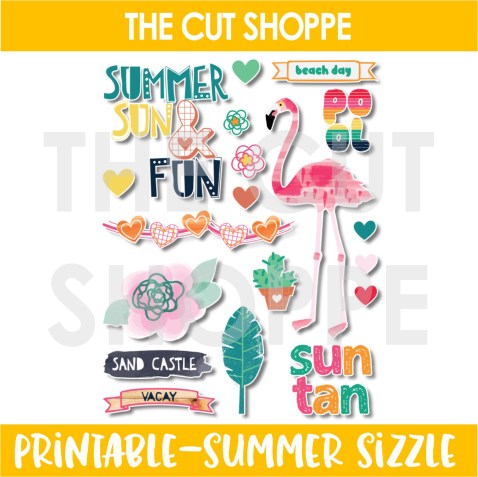
Ashley designed this FREE Summer Sizzle Print Then Cut that is only available in The Cut Shoppe -Scrap Spot- Facebook Group, so be sure to head there to download a free copy. You can still use this printable even if you don’t own a die cut machine. Just print it out and then fussy cut all of those cute images!

I do have a step-by-step tutorial for Print Then Cut (PTC) included in the Process Video at the end of this blog post, but a PTC file is uploaded almost exactly the same as a regular cut file in Cricut Design Space. The only step that is different is at the very end. You will want to save it as a PTC file rather than a Cut File. One of the things I love about The Cut Shoppe is all files are on a transparent background so it makes uploading into Design Space a breeze!

12x12 scrapbook layout for The Cut Shoppe Design Team using the Summer Sizzle Print Then Cut & Bella Blvd Island Escape Collection.

For my layout today I cut a circle from the Full Circle Cut File on white cardstock. I then backed the cut file using the Tropical Bliss Patterned Paper from the Bella Blvd Island Escape Collection. PTC files are great to use as embellishments and the bonus is you will never run out! You just print another copy! I used multiple icons from The Cut Shoppe FREE Summer Sizzle Print Then Cut. I also used multiple Die Cuts and Chipboard Pieces from the same Bella Blvd Collection for additional embellishing.

12x12 scrapbook layout for The Cut Shoppe Design Team using the Summer Sizzle Print Then Cut & Bella Blvd Island Escape Collection.

Sometimes white cardstock feels too bright so I wanted to break that color up a bit before I adhered down my embellishments and photo. So, I added a splash of pink behind the embellishments using a pink mist from Shimmerz Paints. I was trying to figure out what I should do for a title & where my title placement should go. I decided to place it directly in the center of the cut file using a phrase and a banner from The Cut Shoppe Printable.

12x12 scrapbook layout for The Cut Shoppe Design Team using the Summer Sizzle Print Then Cut & Bella Blvd Island Escape Collection.

Now you can take a look at my process video that includes a Cricut Design Space tutorial showing you how to upload, print and cut this free printable from The Cut Shoppe.

Thanks so much for spending part of your day with my today! Please let me know if you have any questions about the Print Then Cut process!

This blog post contains affiliate links. This means I will receive a commission (at no cost to you) from items that are purchased from these affiliate links.

I Adore You – New Orleans | Pretty Little Studio

Hey there friends! I have another layout to share with you today as a guest designer with Pretty Little Studio.

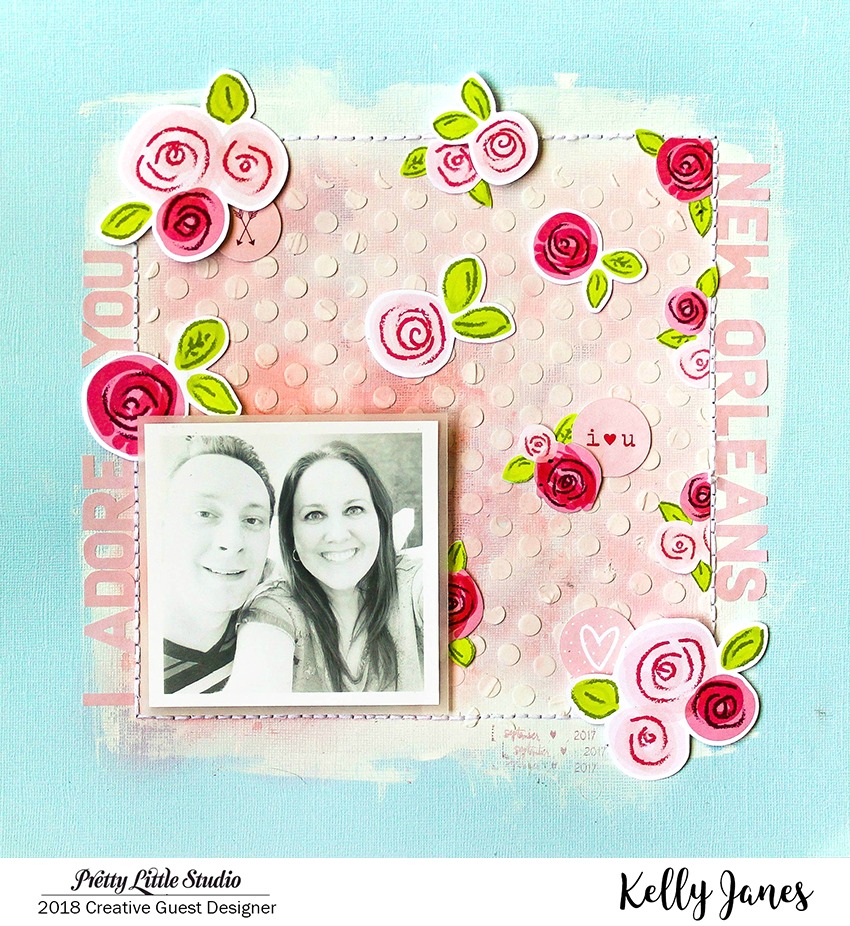
12x12 mixed media scrapbook layout using the Pretty Little Studio XOXO Collection designed by Hello Heather.

I started with a light blue cardstock background and then used a T-Square Ruler & a pencil to draw a square on the background. I then used a piercing tool to poke holes along the pencil lines for hand stitching. Before I started the hand stitching I wanted to add color to the background, but I needed to add a base to the colored cardstock first. I added white gesso to the background for a few reasons – it will help strengthen the paper, make the colors easier to blend, and give a white/clean surface so the mixed media will stay its true original color. The color would have had a completely different appearance if I would have added the pink directly onto the blue cardstock.

12x12 mixed media scrapbook layout using the Pretty Little Studio XOXO Collection designed by Hello Heather.

I used Abandoned Coral & Worn Lipstick Distress Oxide Inks to add color within the square. I started by first using the packaging technique, but I wasn’t getting enough color saturation. I switched to a Mini Ink Blending Tool to add color directly on top of the white gesso to achieve the look I was going for. After I had the color on the background I used a Heidi Swapp Polka Dot Stencil & White Modeling Paste to add texture to the background.

12x12 mixed media scrapbook layout using the Pretty Little Studio XOXO Collection designed by Hello Heather.

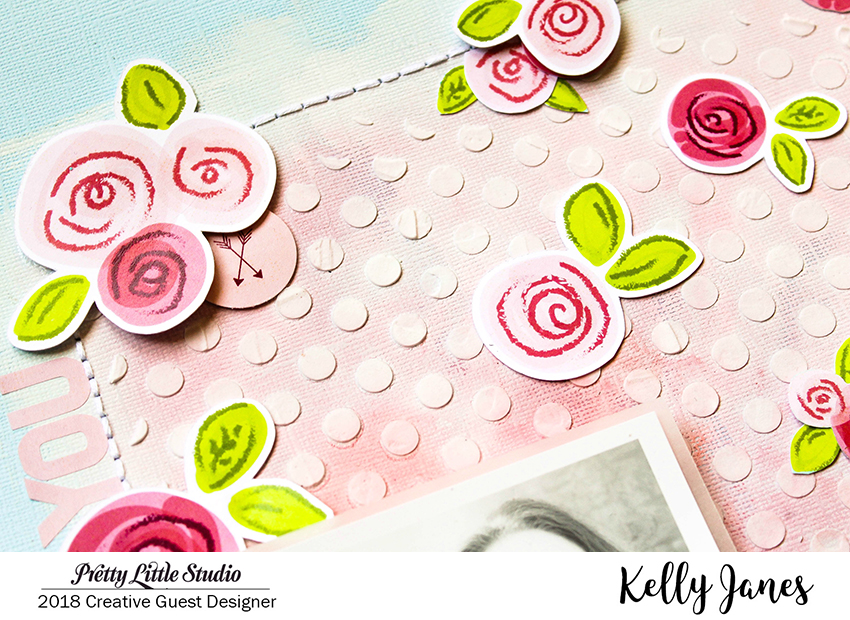
I added the hand stitching after the modeling paste was dry and then moved onto embellishing using the XOXO Collection designed by Hello Heather. I added my photo first, which was taken on a trip to New Orleans, to the bottom left corner of the square. Then I grabbed a few die cuts from the Blooming Love Die Cuts Pack & also fussy cut a few of the same florals from the Love Blooms 8×8 Patterned Paper. To throw in additional embellishing and another shape I added a few circles from the Love You Die Cuts & one of the 4×6 Patterned Papers. I added the title along the outer edge of the hand stitching using the Blush Love Story Alphas. I absolutely love these alphas. The colors, the texture, the size – all perfect!!

12x12 mixed media scrapbook layout using the Pretty Little Studio XOXO Collection designed by Hello Heather.

Now you can take a look at my YouTube Process Video that shows how this layout came together!

Thank you so much for spending part of your day with me!

This blog post contains affiliate links to scrapbook.com. This means I will receive a commission (at no cost to you) from items purchased from those affiliate links.